> ## Documentation Index
> Fetch the complete documentation index at: https://docs-staging-feat-one-trust-integration.mintlify.site/llms.txt
> Use this file to discover all available pages before exploring further.

# Variables et fonctions utilitaires

> Apprenez à utiliser les variables dans les Formulaires pour les Actions.

Les variables vous permettent d’accéder aux données contenues dans les Formulaires et les Flux pour créer une logique commerciale et des automatismes personnalisés.

Voici quelques considérations de base sur l’utilisation des variables :

* Les variables sont entourées d’accolades `{{ variable }}`.
* Si une variable n’existe pas ou ne peut pas être résolue, elle a le même effet qu’une variable dont la valeur est `undefined (indéfini)`.
* Vous pouvez utiliser des opérateurs nuls pour gérer les variables dont la valeur est `null` ou `undefined`, par exemple :`{{fields.foo ?? fields.bar}}`.

## Variables disponibles

Vous pouvez utiliser différents types de variables pour référencer et transformer les données que vous recueillez auprès des clients avec les Formulaires et les Flux.

| Variable                   | \_Syntax          | Where              | Description                                                                  |
| -------------------------- | ----------------- | ------------------ | ---------------------------------------------------------------------------- |
| Contexte                   | `{{contexte.*}}`  | Formes / Flux      | Données contextuelles de référence de la transaction en cours                |
| Champs de formulaire       | `{{fields. *}}`   | Formulaires / Flux | Données de référence des champs de votre formulaire et des champs cachés     |
| Variables partagées        | `{{vars.*}}`      | Formulaires / Flux | Données de référence stockées en tant que variables partagées                |
| Sortie des actions de flux | `{{actions. *}}`  | Flux               | Données de référence de la réponse de sortie des actions de flux précédentes |
| Fonctions d’aide           | `{{fonctions.*}}` | Formulaires / Flux | Fonctions d’aide pour transformer les données                                |

### Variables de contexte

Les Formulaires et les Flux héritent automatiquement des variables de contexte de la transaction en cours. Vous pouvez accéder aux variables de contexte suivantes :

* L’objet `user`, avec accès aux propriétés suivantes :

  * `user.user_id`
  * `user.username`
  * `user.name`
  * `user.given_name`
  * `user.family_name`
  * `user.nickname`
  * `user.email`
  * `user.email_verified`
  * `user.phone_number`
  * `user.phone_verified`
  * `user.picture`
  * `user.user_metadata`
  * `user.app_metadata`
  * `user.created_at`
  * `user.updated_at`
  * `user.last_password_reset`
  * `user.identities`
* L’objet `organization`, avec accès aux propriétés suivantes :

  * `organization.id`
  * `organization.name`
  * `organization.display_name`
  * `organization.metadata`
* L’objet `client`, avec accès aux propriétés suivantes :

  * `client.client_id`
  * `client.name`
* L’objet `tenant (locataire)`, avec accès à la propriété suivante :

  * `tenant.name`
* L’objet `transaction`, avec accès à la propriété suivante :

  * `transaction.state`

<Accordion title="Exemple d’objet contextuel">
  ```json lines theme={null}
  {
    "user": {
      "user_id": "auth0|658409...",
      "name": "ana@travel0.com",
      "nickname": "ana",
      "email": "ana@travel0.com",
      "email_verified": true,
      "picture": "https://s.gravatar.com/avatar/8eb1b522f6...",
      "user_metadata": {},
      "app_metadata": {},
      "created_at": "2023-12-21T09:46:40.487Z",
      "updated_at": "2024-05-07T10:44:26.271Z",
      "last_password_reset": "2023-12-21T09:49:08.932Z",
      "identities": [
        {
          "user_id": "6584...",
          "isSocial": false,
          "provider": "auth0",
          "connection": "Username-Password-Authentication"
        }
      ]
    },
    "client": {
      "client_id": "xpeg5...",
      "name": "My App"
    },
    "tenant": {
      "name": "tenant-testing"
    },
    "transaction": {
      "state": "hKFo2SBId2M0..."
    }
  }
  ```
</Accordion>

Par exemple :  `{{context.user.user_id}}` référence `user_id` de l’objet `user`.

<Frame>
  <img src="https://mintcdn.com/docs-staging-feat-one-trust-integration/6pox9matMFCneCQj/docs/images/fr-ca/cdy7uua7fh8z/3B8DRhXO2wGqeqSFb8KbQv/0a61cdbbb7f1d290950a2ddb9857aac3/Contex-variable.png?fit=max&auto=format&n=6pox9matMFCneCQj&q=85&s=a9ba805a3bcdc93bc0d98cf8ab1ab701" alt="Dashboard > Forms > Flows" data-og-width="1141" width="1141" data-og-height="219" height="219" data-path="docs/images/fr-ca/cdy7uua7fh8z/3B8DRhXO2wGqeqSFb8KbQv/0a61cdbbb7f1d290950a2ddb9857aac3/Contex-variable.png" data-optimize="true" data-opv="3" srcset="https://mintcdn.com/docs-staging-feat-one-trust-integration/6pox9matMFCneCQj/docs/images/fr-ca/cdy7uua7fh8z/3B8DRhXO2wGqeqSFb8KbQv/0a61cdbbb7f1d290950a2ddb9857aac3/Contex-variable.png?w=280&fit=max&auto=format&n=6pox9matMFCneCQj&q=85&s=e7677626fa324ce2ebef480b36f4631e 280w, https://mintcdn.com/docs-staging-feat-one-trust-integration/6pox9matMFCneCQj/docs/images/fr-ca/cdy7uua7fh8z/3B8DRhXO2wGqeqSFb8KbQv/0a61cdbbb7f1d290950a2ddb9857aac3/Contex-variable.png?w=560&fit=max&auto=format&n=6pox9matMFCneCQj&q=85&s=79948935dad0c45bb7bd6415f3671271 560w, https://mintcdn.com/docs-staging-feat-one-trust-integration/6pox9matMFCneCQj/docs/images/fr-ca/cdy7uua7fh8z/3B8DRhXO2wGqeqSFb8KbQv/0a61cdbbb7f1d290950a2ddb9857aac3/Contex-variable.png?w=840&fit=max&auto=format&n=6pox9matMFCneCQj&q=85&s=fba05d93ad96c7ee2727a4d53c573188 840w, https://mintcdn.com/docs-staging-feat-one-trust-integration/6pox9matMFCneCQj/docs/images/fr-ca/cdy7uua7fh8z/3B8DRhXO2wGqeqSFb8KbQv/0a61cdbbb7f1d290950a2ddb9857aac3/Contex-variable.png?w=1100&fit=max&auto=format&n=6pox9matMFCneCQj&q=85&s=36fc370ccefdebc2fe410081f029004e 1100w, https://mintcdn.com/docs-staging-feat-one-trust-integration/6pox9matMFCneCQj/docs/images/fr-ca/cdy7uua7fh8z/3B8DRhXO2wGqeqSFb8KbQv/0a61cdbbb7f1d290950a2ddb9857aac3/Contex-variable.png?w=1650&fit=max&auto=format&n=6pox9matMFCneCQj&q=85&s=fbed039e2ece8e9e40fd5c5c693dce3e 1650w, https://mintcdn.com/docs-staging-feat-one-trust-integration/6pox9matMFCneCQj/docs/images/fr-ca/cdy7uua7fh8z/3B8DRhXO2wGqeqSFb8KbQv/0a61cdbbb7f1d290950a2ddb9857aac3/Contex-variable.png?w=2500&fit=max&auto=format&n=6pox9matMFCneCQj&q=85&s=7e256737db0055b610eef793c6c1069c 2500w" />
</Frame>

### Variables des champs du formulaire

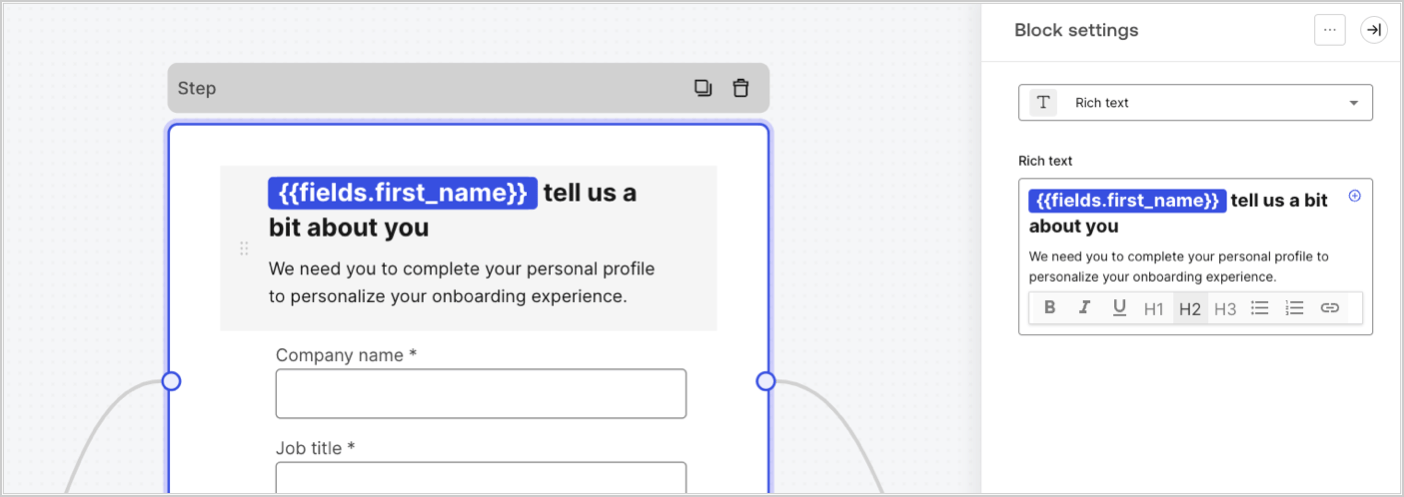
Les variables de champ contiennent les données recueillies auprès de l’utilisateur dans les champs de saisie du formulaire et les données des champs cachés. Les données de chaque champ varient en fonction du type de champ. Par exemple : `{{fields.first_name}}` référence la valeur saisie dans le champ ayant l’ID `first_name`.
<Frame>
  <img src="https://mintcdn.com/docs-staging-feat-one-trust-integration/7lhynHmhsC58trB-/docs/images/fr-ca/cdy7uua7fh8z/4D42A6ww4XvFxweoxh04Rd/016c2ed9d25bc2267ed3ed31bf8b2bf6/form-fields-variable.png?fit=max&auto=format&n=7lhynHmhsC58trB-&q=85&s=657d08c8689033b1bd2a9f6f05939ab5" alt="Dashboard > Actions > Forms > Form" data-og-width="1404" width="1404" data-og-height="497" height="497" data-path="docs/images/fr-ca/cdy7uua7fh8z/4D42A6ww4XvFxweoxh04Rd/016c2ed9d25bc2267ed3ed31bf8b2bf6/form-fields-variable.png" data-optimize="true" data-opv="3" srcset="https://mintcdn.com/docs-staging-feat-one-trust-integration/7lhynHmhsC58trB-/docs/images/fr-ca/cdy7uua7fh8z/4D42A6ww4XvFxweoxh04Rd/016c2ed9d25bc2267ed3ed31bf8b2bf6/form-fields-variable.png?w=280&fit=max&auto=format&n=7lhynHmhsC58trB-&q=85&s=b5757b3ce076037f03cf0a3cd8ed5789 280w, https://mintcdn.com/docs-staging-feat-one-trust-integration/7lhynHmhsC58trB-/docs/images/fr-ca/cdy7uua7fh8z/4D42A6ww4XvFxweoxh04Rd/016c2ed9d25bc2267ed3ed31bf8b2bf6/form-fields-variable.png?w=560&fit=max&auto=format&n=7lhynHmhsC58trB-&q=85&s=e6d0b55808f66b87da6819e69577fe90 560w, https://mintcdn.com/docs-staging-feat-one-trust-integration/7lhynHmhsC58trB-/docs/images/fr-ca/cdy7uua7fh8z/4D42A6ww4XvFxweoxh04Rd/016c2ed9d25bc2267ed3ed31bf8b2bf6/form-fields-variable.png?w=840&fit=max&auto=format&n=7lhynHmhsC58trB-&q=85&s=799edcd1a04d77cda365e865213b12d2 840w, https://mintcdn.com/docs-staging-feat-one-trust-integration/7lhynHmhsC58trB-/docs/images/fr-ca/cdy7uua7fh8z/4D42A6ww4XvFxweoxh04Rd/016c2ed9d25bc2267ed3ed31bf8b2bf6/form-fields-variable.png?w=1100&fit=max&auto=format&n=7lhynHmhsC58trB-&q=85&s=1f261f007c5cfbad649d8c084c469a98 1100w, https://mintcdn.com/docs-staging-feat-one-trust-integration/7lhynHmhsC58trB-/docs/images/fr-ca/cdy7uua7fh8z/4D42A6ww4XvFxweoxh04Rd/016c2ed9d25bc2267ed3ed31bf8b2bf6/form-fields-variable.png?w=1650&fit=max&auto=format&n=7lhynHmhsC58trB-&q=85&s=9bd38ae38ecc0c57d7b9ddfa03fa56b3 1650w, https://mintcdn.com/docs-staging-feat-one-trust-integration/7lhynHmhsC58trB-/docs/images/fr-ca/cdy7uua7fh8z/4D42A6ww4XvFxweoxh04Rd/016c2ed9d25bc2267ed3ed31bf8b2bf6/form-fields-variable.png?w=2500&fit=max&auto=format&n=7lhynHmhsC58trB-&q=85&s=43988e0eb15f11fdba807250f586e5b3 2500w" />
</Frame>

### Variables des actions de sortie de flux

Lorsqu’une action de flux est exécutée, elle génère un objet qui peut être référencé dans les actions suivantes. Par exemple : `{{actions.generate_otp.code}}` référence le code résultant de l’action avec l’ID`generate_otp`.

<Frame>
  <img src="https://mintcdn.com/docs-staging-feat-one-trust-integration/ojDPogcMK-XxA8wZ/docs/images/fr-ca/cdy7uua7fh8z/6jYtEdYqSGXm3DDv0mxQ0o/2d48012629745e07137bf6ba42f4d829/flow-output-variable.png?fit=max&auto=format&n=ojDPogcMK-XxA8wZ&q=85&s=36a17d682d61911fcdd313b39efcc098" alt="Dashboard > Actions > Forms > Flows" data-og-width="1404" width="1404" data-og-height="253" height="253" data-path="docs/images/fr-ca/cdy7uua7fh8z/6jYtEdYqSGXm3DDv0mxQ0o/2d48012629745e07137bf6ba42f4d829/flow-output-variable.png" data-optimize="true" data-opv="3" srcset="https://mintcdn.com/docs-staging-feat-one-trust-integration/ojDPogcMK-XxA8wZ/docs/images/fr-ca/cdy7uua7fh8z/6jYtEdYqSGXm3DDv0mxQ0o/2d48012629745e07137bf6ba42f4d829/flow-output-variable.png?w=280&fit=max&auto=format&n=ojDPogcMK-XxA8wZ&q=85&s=f0f8909f8ae536b935462b6de36db095 280w, https://mintcdn.com/docs-staging-feat-one-trust-integration/ojDPogcMK-XxA8wZ/docs/images/fr-ca/cdy7uua7fh8z/6jYtEdYqSGXm3DDv0mxQ0o/2d48012629745e07137bf6ba42f4d829/flow-output-variable.png?w=560&fit=max&auto=format&n=ojDPogcMK-XxA8wZ&q=85&s=cde13a595eaee312dbe3476c532c27b0 560w, https://mintcdn.com/docs-staging-feat-one-trust-integration/ojDPogcMK-XxA8wZ/docs/images/fr-ca/cdy7uua7fh8z/6jYtEdYqSGXm3DDv0mxQ0o/2d48012629745e07137bf6ba42f4d829/flow-output-variable.png?w=840&fit=max&auto=format&n=ojDPogcMK-XxA8wZ&q=85&s=dc72cb216ba367e4ac3aca1a2100f29b 840w, https://mintcdn.com/docs-staging-feat-one-trust-integration/ojDPogcMK-XxA8wZ/docs/images/fr-ca/cdy7uua7fh8z/6jYtEdYqSGXm3DDv0mxQ0o/2d48012629745e07137bf6ba42f4d829/flow-output-variable.png?w=1100&fit=max&auto=format&n=ojDPogcMK-XxA8wZ&q=85&s=148f19812db0c9a06bf6f2bf2d9f87c7 1100w, https://mintcdn.com/docs-staging-feat-one-trust-integration/ojDPogcMK-XxA8wZ/docs/images/fr-ca/cdy7uua7fh8z/6jYtEdYqSGXm3DDv0mxQ0o/2d48012629745e07137bf6ba42f4d829/flow-output-variable.png?w=1650&fit=max&auto=format&n=ojDPogcMK-XxA8wZ&q=85&s=3bc1dadd091db1c90969116a393e0ce7 1650w, https://mintcdn.com/docs-staging-feat-one-trust-integration/ojDPogcMK-XxA8wZ/docs/images/fr-ca/cdy7uua7fh8z/6jYtEdYqSGXm3DDv0mxQ0o/2d48012629745e07137bf6ba42f4d829/flow-output-variable.png?w=2500&fit=max&auto=format&n=ojDPogcMK-XxA8wZ&q=85&s=95d651afc5c4b5bd8309b629700f8bc0 2500w" />
</Frame>

### Variables partagées

Vous pouvez stocker des variables à partager avec des flux ultérieurs ou même avec des composants de formulaire dans la même transaction. Les variables partagées sont éphémères et sont associées à un parcours de formulaire spécifique. Leurs valeurs ne sont pas accessibles en dehors de ce parcours. Par exemple : `{{vars.external_id}}` référence la valeur d’une variable partagée avec l’ID `external_id`.

<Frame>
  <img src="https://mintcdn.com/docs-staging-feat-one-trust-integration/7lhynHmhsC58trB-/docs/images/fr-ca/cdy7uua7fh8z/4571ExRTHL0KZKJKX9pNwj/abb631b8608a6356b0e5b3784cf8b02f/flow-shared-variable.png?fit=max&auto=format&n=7lhynHmhsC58trB-&q=85&s=a7dd84e0232551220cbca2705d3b3108" alt="Dashboard > Actions > Forms > Flows" data-og-width="1215" width="1215" data-og-height="162" height="162" data-path="docs/images/fr-ca/cdy7uua7fh8z/4571ExRTHL0KZKJKX9pNwj/abb631b8608a6356b0e5b3784cf8b02f/flow-shared-variable.png" data-optimize="true" data-opv="3" srcset="https://mintcdn.com/docs-staging-feat-one-trust-integration/7lhynHmhsC58trB-/docs/images/fr-ca/cdy7uua7fh8z/4571ExRTHL0KZKJKX9pNwj/abb631b8608a6356b0e5b3784cf8b02f/flow-shared-variable.png?w=280&fit=max&auto=format&n=7lhynHmhsC58trB-&q=85&s=fcf512a92e96a3c4ca96ae7006c51628 280w, https://mintcdn.com/docs-staging-feat-one-trust-integration/7lhynHmhsC58trB-/docs/images/fr-ca/cdy7uua7fh8z/4571ExRTHL0KZKJKX9pNwj/abb631b8608a6356b0e5b3784cf8b02f/flow-shared-variable.png?w=560&fit=max&auto=format&n=7lhynHmhsC58trB-&q=85&s=edea60417c53b290b71d28d7c7c3794a 560w, https://mintcdn.com/docs-staging-feat-one-trust-integration/7lhynHmhsC58trB-/docs/images/fr-ca/cdy7uua7fh8z/4571ExRTHL0KZKJKX9pNwj/abb631b8608a6356b0e5b3784cf8b02f/flow-shared-variable.png?w=840&fit=max&auto=format&n=7lhynHmhsC58trB-&q=85&s=a5013072851346ce58fc3a5efa5fb1ec 840w, https://mintcdn.com/docs-staging-feat-one-trust-integration/7lhynHmhsC58trB-/docs/images/fr-ca/cdy7uua7fh8z/4571ExRTHL0KZKJKX9pNwj/abb631b8608a6356b0e5b3784cf8b02f/flow-shared-variable.png?w=1100&fit=max&auto=format&n=7lhynHmhsC58trB-&q=85&s=3fe9ea46bdc7716258a1715281c8a345 1100w, https://mintcdn.com/docs-staging-feat-one-trust-integration/7lhynHmhsC58trB-/docs/images/fr-ca/cdy7uua7fh8z/4571ExRTHL0KZKJKX9pNwj/abb631b8608a6356b0e5b3784cf8b02f/flow-shared-variable.png?w=1650&fit=max&auto=format&n=7lhynHmhsC58trB-&q=85&s=678a014fcddbb5eef28b47394875c82e 1650w, https://mintcdn.com/docs-staging-feat-one-trust-integration/7lhynHmhsC58trB-/docs/images/fr-ca/cdy7uua7fh8z/4571ExRTHL0KZKJKX9pNwj/abb631b8608a6356b0e5b3784cf8b02f/flow-shared-variable.png?w=2500&fit=max&auto=format&n=7lhynHmhsC58trB-&q=85&s=49b5532b175e9dd94f4c4ffa705119e3 2500w" />
</Frame>

<Warning>
  Variables partagées :

  * elles sont internes (côté serveur) et ne sont pas exposées au navigateur (côté client).
  * elle peuvent être résolues et exposées au navigateur si vous avez référencé une variable partagée dans le composant de formulaire.
</Warning>

### Fonctions utilitaires

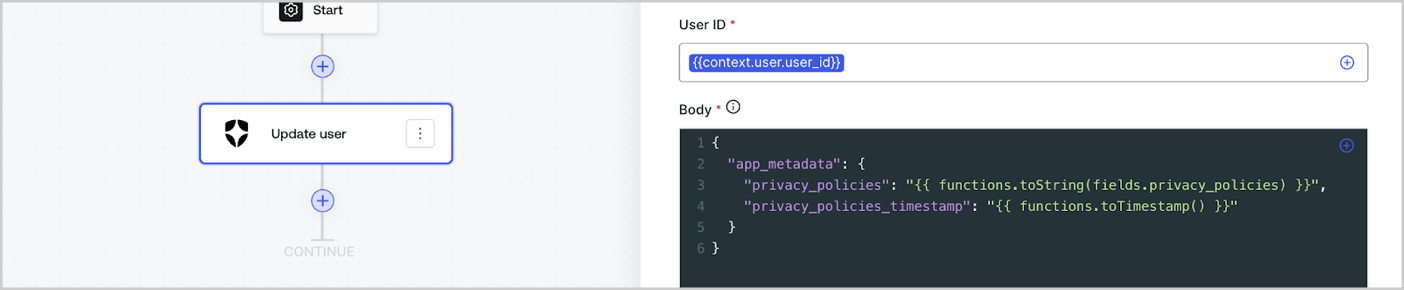
Les fonctions utilitaires permettent de transformer les données et d’effectuer des opérations simples. Par exemple : `{{functions.toString(fields.privacy_policies)}}` transforme la valeur du champ ayant l’ID `privacy_policies` utilisant la fonction `toString()`.
<Frame>
  <img src="https://mintcdn.com/docs-staging-feat-one-trust-integration/EOjvk_PGMxT1i4j8/docs/images/fr-ca/cdy7uua7fh8z/1gyox33XJEtdkT43NppblT/0e878cc5ae2bde11b4207e105bbac6c5/flow-helper-functions.png?fit=max&auto=format&n=EOjvk_PGMxT1i4j8&q=85&s=9c4001bac4fc2c531b3884ebcbe3e61d" alt="Dashboard > Actions > Forms > Flows" data-og-width="1404" width="1404" data-og-height="290" height="290" data-path="docs/images/fr-ca/cdy7uua7fh8z/1gyox33XJEtdkT43NppblT/0e878cc5ae2bde11b4207e105bbac6c5/flow-helper-functions.png" data-optimize="true" data-opv="3" srcset="https://mintcdn.com/docs-staging-feat-one-trust-integration/EOjvk_PGMxT1i4j8/docs/images/fr-ca/cdy7uua7fh8z/1gyox33XJEtdkT43NppblT/0e878cc5ae2bde11b4207e105bbac6c5/flow-helper-functions.png?w=280&fit=max&auto=format&n=EOjvk_PGMxT1i4j8&q=85&s=09714e6e86d628dcb4c96725291a5b17 280w, https://mintcdn.com/docs-staging-feat-one-trust-integration/EOjvk_PGMxT1i4j8/docs/images/fr-ca/cdy7uua7fh8z/1gyox33XJEtdkT43NppblT/0e878cc5ae2bde11b4207e105bbac6c5/flow-helper-functions.png?w=560&fit=max&auto=format&n=EOjvk_PGMxT1i4j8&q=85&s=8bca84933fe2afb5439462791b8a3727 560w, https://mintcdn.com/docs-staging-feat-one-trust-integration/EOjvk_PGMxT1i4j8/docs/images/fr-ca/cdy7uua7fh8z/1gyox33XJEtdkT43NppblT/0e878cc5ae2bde11b4207e105bbac6c5/flow-helper-functions.png?w=840&fit=max&auto=format&n=EOjvk_PGMxT1i4j8&q=85&s=3944f618cf7e1d6dec9c86f967e43b8c 840w, https://mintcdn.com/docs-staging-feat-one-trust-integration/EOjvk_PGMxT1i4j8/docs/images/fr-ca/cdy7uua7fh8z/1gyox33XJEtdkT43NppblT/0e878cc5ae2bde11b4207e105bbac6c5/flow-helper-functions.png?w=1100&fit=max&auto=format&n=EOjvk_PGMxT1i4j8&q=85&s=c2e4bc73e403cebb9e8f45ad7ef91455 1100w, https://mintcdn.com/docs-staging-feat-one-trust-integration/EOjvk_PGMxT1i4j8/docs/images/fr-ca/cdy7uua7fh8z/1gyox33XJEtdkT43NppblT/0e878cc5ae2bde11b4207e105bbac6c5/flow-helper-functions.png?w=1650&fit=max&auto=format&n=EOjvk_PGMxT1i4j8&q=85&s=e48943d1bd9d414973712c048a4076d4 1650w, https://mintcdn.com/docs-staging-feat-one-trust-integration/EOjvk_PGMxT1i4j8/docs/images/fr-ca/cdy7uua7fh8z/1gyox33XJEtdkT43NppblT/0e878cc5ae2bde11b4207e105bbac6c5/flow-helper-functions.png?w=2500&fit=max&auto=format&n=EOjvk_PGMxT1i4j8&q=85&s=292b0b534b183423a05318670145ce7c 2500w" />
</Frame>

Les fonctions utilitaires disponibles sont les suivantes :

| Fonction                               | Description                                                                                                                                                                                                                                                                                   | Exemple                                                                                                          |
| -------------------------------------- | --------------------------------------------------------------------------------------------------------------------------------------------------------------------------------------------------------------------------------------------------------------------------------------------- | ---------------------------------------------------------------------------------------------------------------- |
| toArray(value)                         | Convertit la valeur en un tableau                                                                                                                                                                                                                                                             | {"{{ functions.toArray('abc') }}"} // \['abc']                                                                   |
| toBoolean(value)                       | Convertit la valeur en valeur booléenne                                                                                                                                                                                                                                                       | {"{{ functions.toBoolean(1) }}"} // true<br /><br />{"{{ functions.toBoolean(0) }}"} // false                    |
| length(value)                          | Renvoie la longueur de la valeur du paramètre                                                                                                                                                                                                                                                 | {"{{ functions.length('auth0') }}"} // 5                                                                         |
| mask(value)                            | Masque une valeur pour éviter l’exposition dans les exécutions                                                                                                                                                                                                                                | {"{{ functions.mask('my_awesome_secret') }}"} // ███                                                             |
| toNumber(value)                        | Convertit la valeur en nombre                                                                                                                                                                                                                                                                 | {"{{ functions.toNumber('123') }}"} // 123                                                                       |
| random(min, max, \[boolean])           | Renvoie un nombre aléatoire compris entre les valeurs minimales et maximales incluses.                                                                                                                                                                                                        | {"{{ functions.random(0, 6) }}"} // 4<br /><br />{"{{ functions.random(0, 6, true) }}"} // 3.8523497...          |
| slice(value, start, end)               | Renvoie une section d’un tableau de valeurs ou d’une chaîne de caractères entre les indices de début et de fin.                                                                                                                                                                               | {"{{ functions.slice( 'example', 3, 5) }}"} // 'mp'                                                              |
| toString(value)                        | Convertit la valeur en chaîne                                                                                                                                                                                                                                                                 | {"{{ functions.toString(123) }}"} // '123'                                                                       |
| substring(value, start, end)           | Renvoie une section d’une valeur entre les indices de début et de fin. En savoir plus sur les [différences entre les fonctions slice et substring](https://developer.mozilla.org/en-US/docs/Web/JavaScript/Reference/Global_Objects/String/substring#differences_between_substring_and_slice) | {"{{ functions.substring( 'example', 3, 5) }}"} // 'mp'                                                          |
| toTimestamp()                          | Renvoie l’horodatage UNIX actuel                                                                                                                                                                                                                                                              | {"{{ functions.toTimestamp() }}"} // 1628761483                                                                  |
| toTimestamp(date)                      | Renvoie la date fournie en heure UNIX                                                                                                                                                                                                                                                         | {"{{ functions.toTimestamp('2021-04-30T10:02:50.876Z') }}"} // 1619776970                                        |
| toTimestamp(date)                      | Renvoie la date fournie en heure UNIX                                                                                                                                                                                                                                                         | {"{{ functions.toTimestamp('2021-04-30T10:02:50.876Z') }}"} // 1619776970                                        |
| replaceAll(value, string, replacement) | Renvoie une nouvelle chaîne dans laquelle toutes les correspondances d’un modèle sont remplacées par un substitut.                                                                                                                                                                            | {"{{ functions.replaceall('2021-04-30', '-', '/') }}"} // 2021/04/30                                             |
| replace(value, string, replacement)    | Renvoie une nouvelle chaîne dans laquelle toutes les correspondances d’un modèle sont remplacées par un substitut. Si le motif est une chaîne, seule la première occurrence sera remplacée.                                                                                                   | {"{{ functions.replace('2021-04-30', '-', '/') }}"} // 2021/04-30                                                |
| split(value, separator, limit?)        | Renvoie une liste ordonnée de sous-chaînes divisées par le séparateur.                                                                                                                                                                                                                        | {"{{ functions.split('2021-04-30', '-') }}"} // \['2021', '04', '30']                                            |
| now()                                  | Renvoie la date actuelle au format ISO 8601.                                                                                                                                                                                                                                                  | {"{{ functions.now() }}"} // 2021-04-30T10:31:28.576Z                                                            |
| includes(collection, item, fromIndex?) | Renvoie le fait qu’un tableau contienne une certaine valeur parmi ses entrées.                                                                                                                                                                                                                | {"{{ functions.includes(['auth0', 'identity', 'authentication'], 'identity') }}"} // true                        |
| indexOf(collection, item, fromIndex?)  | Renvoie le premier indice auquel un élément donné peut être trouvé dans le tableau, ou -1 s’il n’est pas présent.                                                                                                                                                                             | {"{{ functions.indexOf(['auth0', 'identity', 'authentication'], 'identity') }}"} // 1                            |
| merge(base, value)                     | Renvoie un tableau fusionné, un objet ou concatène une chaîne de caractères en fonction du type de données de base.                                                                                                                                                                           | {"{{ functions.merge(['auth0', 'identity'], ['authentication']) }}"} // \['auth0', 'identity', 'authentication'] |
| md5(value)                             | Renvoie une valeur hachée MD5.                                                                                                                                                                                                                                                                | {"{{ functions.md5('auth0') }}"} // 7bbb597...                                                                   |
| sha1(value)                            | Renvoie une valeur hachée SHA1.                                                                                                                                                                                                                                                               | {"{{ functions.sha1('auth0') }}"} // b4ec5339...                                                                 |
| sha256(value)                          | Renvoie une valeur hachée SHA256.                                                                                                                                                                                                                                                             | {"{{ functions.sha256('auth0') }}"} // d9082bdc...                                                               |
| sha512(value)                          | Renvoie une valeur hachée SHA512.                                                                                                                                                                                                                                                             | {"{{ functions.sha512('auth0') }}"} // c0d588069d...                                                             |
| uuid()                                 | Renvoie un UUID v4 aléatoire                                                                                                                                                                                                                                                                  | {"{{ functions.uuid() }}"} // 36b8f84d-df4e-4d49-b662-bcde71a8764                                                |

## Meilleures pratiques pour les variables

### Utiliser des ID significatifs

Lorsque vous ajoutez un champ de Formulaire ou une action de Flux, l’ID est automatiquement généré.

Mettez à jour l’ID avec une valeur plus descriptive afin de pouvoir identifier les informations qu’il contient. Par exemple, si vous créez un champ de Formulaire qui stocke le prénom de l’utilisateur, modifiez l’ID en `first_name`.

### Soyez vigilant lorsque vous mettez à jour des ID existants

Si une variable est déjà utilisée et que vous devez modifier son ID, identifiez l’endroit où vous l’avez référencée et mettez l’ID à jour en conséquence pour éviter les valeurs indéfinies ou vides.

### Vérifier l’exécution des Flux

Si vous constatez une valeur de variable inattendue, utilisez l’aperçu [**Executions (Exécutions)**](/docs/fr-ca/customize/forms/flows/flow-execution-and-debugger) pour dépanner la variable.

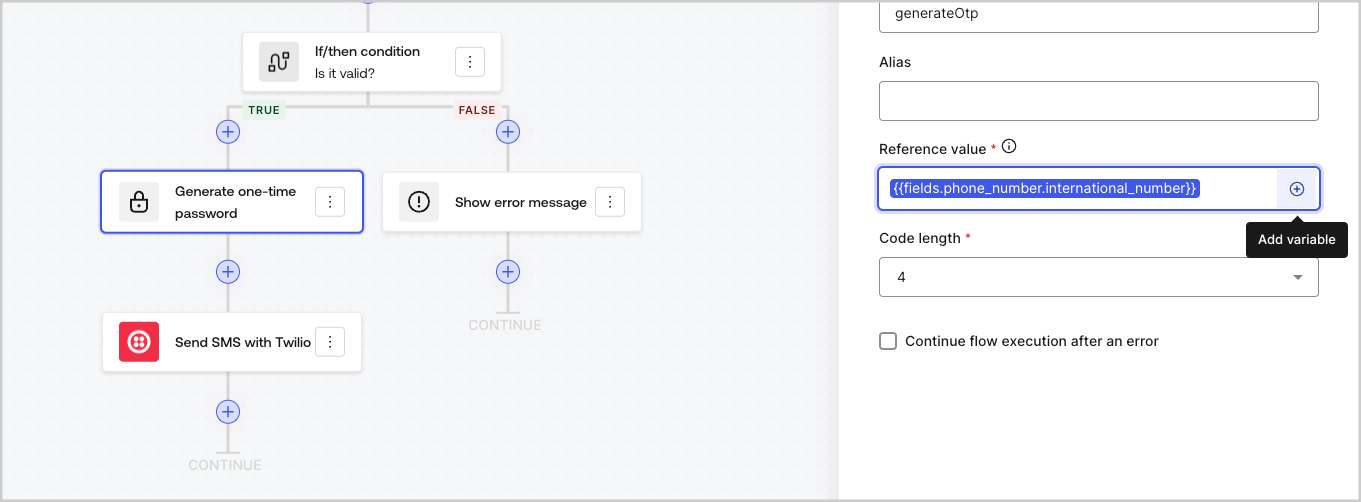
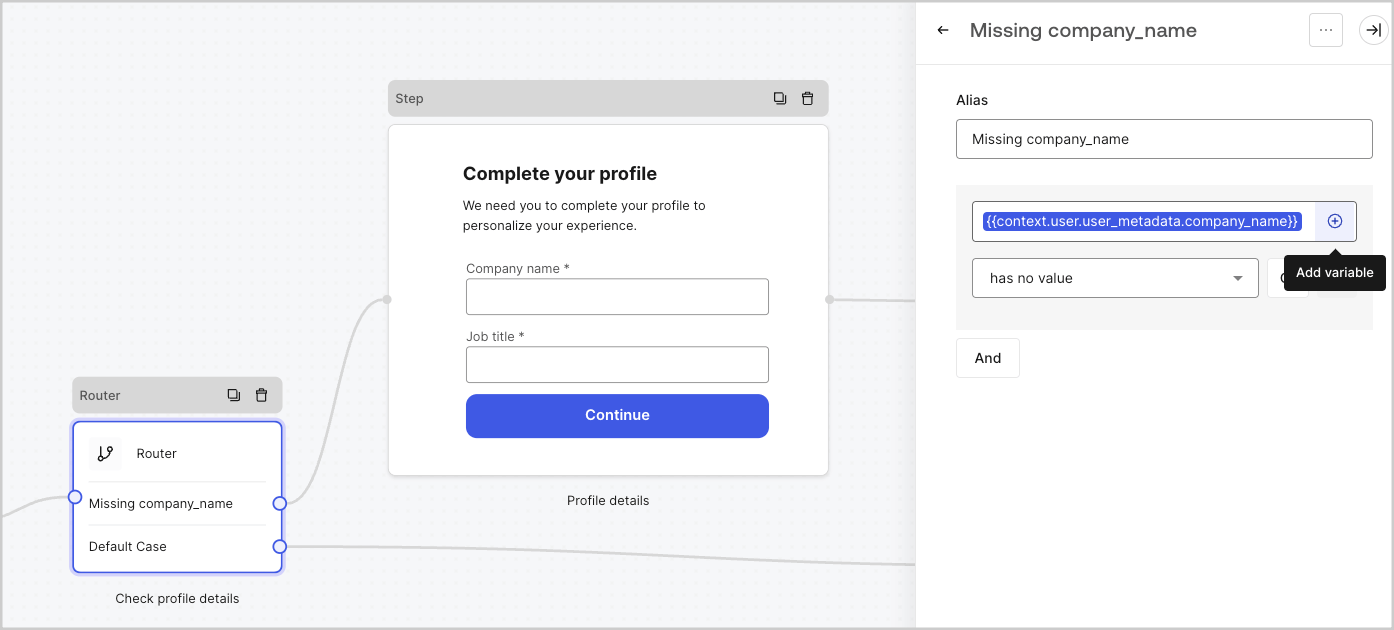
### Utiliser le menu de remplissage automatique

Le menu de remplissage automatique vous aide à localiser et à référencer correctement les variables existantes.
<Frame>
  <img src="https://mintcdn.com/docs-staging-feat-one-trust-integration/6pox9matMFCneCQj/docs/images/fr-ca/cdy7uua7fh8z/3SKnDuaMzSImxZtDDAoZaz/9ea800fad29ef71d1ded3c72b87660a4/Autocomplete-flows.png?fit=max&auto=format&n=6pox9matMFCneCQj&q=85&s=c469ca4f546f16e4a09c6e7ed916f9de" alt="Dashboard > Actions > Forms > Flows" data-og-width="1361" width="1361" data-og-height="502" height="502" data-path="docs/images/fr-ca/cdy7uua7fh8z/3SKnDuaMzSImxZtDDAoZaz/9ea800fad29ef71d1ded3c72b87660a4/Autocomplete-flows.png" data-optimize="true" data-opv="3" srcset="https://mintcdn.com/docs-staging-feat-one-trust-integration/6pox9matMFCneCQj/docs/images/fr-ca/cdy7uua7fh8z/3SKnDuaMzSImxZtDDAoZaz/9ea800fad29ef71d1ded3c72b87660a4/Autocomplete-flows.png?w=280&fit=max&auto=format&n=6pox9matMFCneCQj&q=85&s=9b2b364d037719d8a33f2de838c9630f 280w, https://mintcdn.com/docs-staging-feat-one-trust-integration/6pox9matMFCneCQj/docs/images/fr-ca/cdy7uua7fh8z/3SKnDuaMzSImxZtDDAoZaz/9ea800fad29ef71d1ded3c72b87660a4/Autocomplete-flows.png?w=560&fit=max&auto=format&n=6pox9matMFCneCQj&q=85&s=fbe033c0e157f666d847e42c85128267 560w, https://mintcdn.com/docs-staging-feat-one-trust-integration/6pox9matMFCneCQj/docs/images/fr-ca/cdy7uua7fh8z/3SKnDuaMzSImxZtDDAoZaz/9ea800fad29ef71d1ded3c72b87660a4/Autocomplete-flows.png?w=840&fit=max&auto=format&n=6pox9matMFCneCQj&q=85&s=ee2a9dacf47d5e37e8686fb85a4ebf32 840w, https://mintcdn.com/docs-staging-feat-one-trust-integration/6pox9matMFCneCQj/docs/images/fr-ca/cdy7uua7fh8z/3SKnDuaMzSImxZtDDAoZaz/9ea800fad29ef71d1ded3c72b87660a4/Autocomplete-flows.png?w=1100&fit=max&auto=format&n=6pox9matMFCneCQj&q=85&s=571f9284dd7795cfcef0c07c2d53f162 1100w, https://mintcdn.com/docs-staging-feat-one-trust-integration/6pox9matMFCneCQj/docs/images/fr-ca/cdy7uua7fh8z/3SKnDuaMzSImxZtDDAoZaz/9ea800fad29ef71d1ded3c72b87660a4/Autocomplete-flows.png?w=1650&fit=max&auto=format&n=6pox9matMFCneCQj&q=85&s=3b2a8075b111fe1e81fdbdbee92dbc6d 1650w, https://mintcdn.com/docs-staging-feat-one-trust-integration/6pox9matMFCneCQj/docs/images/fr-ca/cdy7uua7fh8z/3SKnDuaMzSImxZtDDAoZaz/9ea800fad29ef71d1ded3c72b87660a4/Autocomplete-flows.png?w=2500&fit=max&auto=format&n=6pox9matMFCneCQj&q=85&s=1d1b527cb12bb21297506b153ce1bace 2500w" />
</Frame>

<Frame>
  <img src="https://mintcdn.com/docs-staging-feat-one-trust-integration/6pox9matMFCneCQj/docs/images/fr-ca/cdy7uua7fh8z/2kjRKozVgrd2a7UJXOANaN/ee5452d7210cd2f13b0e97763f11c82a/Autocomplete-forms.png?fit=max&auto=format&n=6pox9matMFCneCQj&q=85&s=25957b1e2ec5b08d78484213021a1934" alt="Dashboard > Actions > Forms > Form" data-og-width="1394" width="1394" data-og-height="630" height="630" data-path="docs/images/fr-ca/cdy7uua7fh8z/2kjRKozVgrd2a7UJXOANaN/ee5452d7210cd2f13b0e97763f11c82a/Autocomplete-forms.png" data-optimize="true" data-opv="3" srcset="https://mintcdn.com/docs-staging-feat-one-trust-integration/6pox9matMFCneCQj/docs/images/fr-ca/cdy7uua7fh8z/2kjRKozVgrd2a7UJXOANaN/ee5452d7210cd2f13b0e97763f11c82a/Autocomplete-forms.png?w=280&fit=max&auto=format&n=6pox9matMFCneCQj&q=85&s=b0cfb9baa4ee6faea2cdd04d805644b0 280w, https://mintcdn.com/docs-staging-feat-one-trust-integration/6pox9matMFCneCQj/docs/images/fr-ca/cdy7uua7fh8z/2kjRKozVgrd2a7UJXOANaN/ee5452d7210cd2f13b0e97763f11c82a/Autocomplete-forms.png?w=560&fit=max&auto=format&n=6pox9matMFCneCQj&q=85&s=e52217e9e23972dc0e46f30f77ea3f34 560w, https://mintcdn.com/docs-staging-feat-one-trust-integration/6pox9matMFCneCQj/docs/images/fr-ca/cdy7uua7fh8z/2kjRKozVgrd2a7UJXOANaN/ee5452d7210cd2f13b0e97763f11c82a/Autocomplete-forms.png?w=840&fit=max&auto=format&n=6pox9matMFCneCQj&q=85&s=c39faba242c6a8acc9174758ba525294 840w, https://mintcdn.com/docs-staging-feat-one-trust-integration/6pox9matMFCneCQj/docs/images/fr-ca/cdy7uua7fh8z/2kjRKozVgrd2a7UJXOANaN/ee5452d7210cd2f13b0e97763f11c82a/Autocomplete-forms.png?w=1100&fit=max&auto=format&n=6pox9matMFCneCQj&q=85&s=9579b783aa522cf03be2247a6c803a87 1100w, https://mintcdn.com/docs-staging-feat-one-trust-integration/6pox9matMFCneCQj/docs/images/fr-ca/cdy7uua7fh8z/2kjRKozVgrd2a7UJXOANaN/ee5452d7210cd2f13b0e97763f11c82a/Autocomplete-forms.png?w=1650&fit=max&auto=format&n=6pox9matMFCneCQj&q=85&s=2ed48cdbdd1aa3cc1db10b9eb554057e 1650w, https://mintcdn.com/docs-staging-feat-one-trust-integration/6pox9matMFCneCQj/docs/images/fr-ca/cdy7uua7fh8z/2kjRKozVgrd2a7UJXOANaN/ee5452d7210cd2f13b0e97763f11c82a/Autocomplete-forms.png?w=2500&fit=max&auto=format&n=6pox9matMFCneCQj&q=85&s=428b3a197ee6a101ae4bf09fbce34d13 2500w" />
</Frame>
